
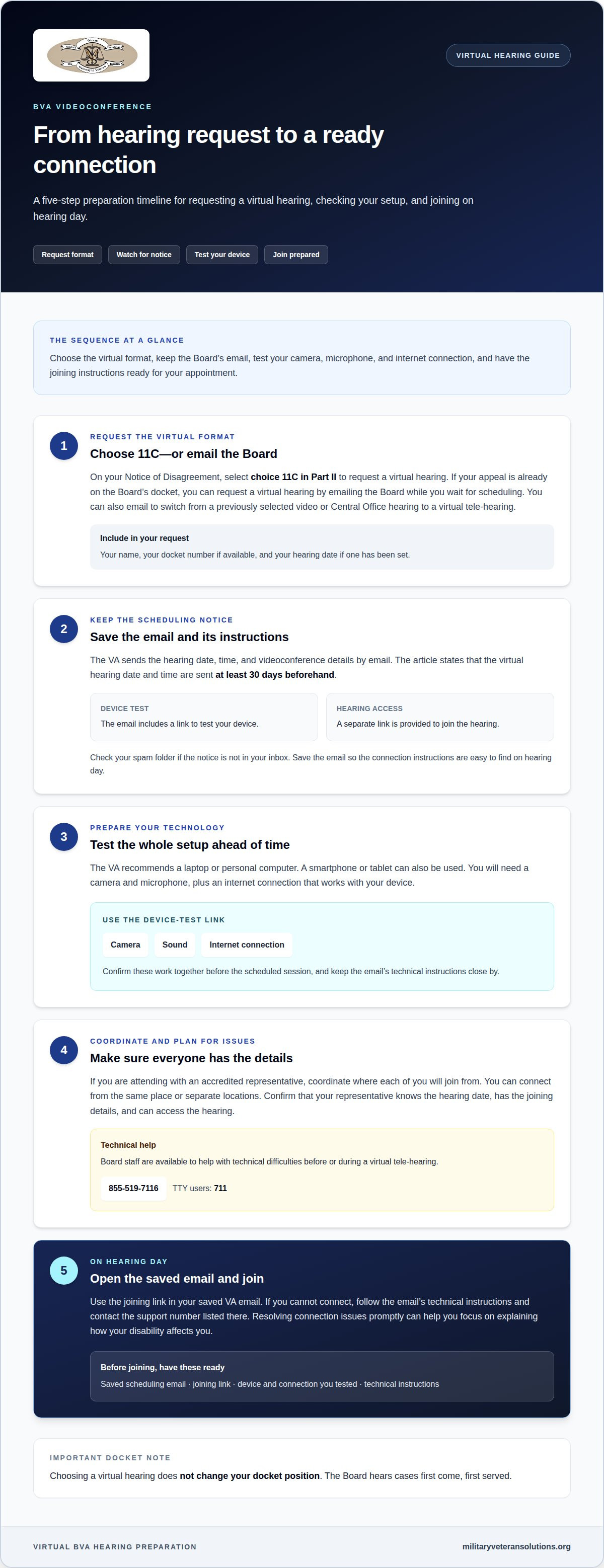
Preparing for a BVA video hearing starts with requesting the virtual format: select choice 11C in Part II of your Notice of Disagreement. If your appeal is already on the Board’s docket, you can also request a virtual hearing by email while you wait to be scheduled. Include your name, docket number if available, and hearing date if one has been set.
Requesting a hearing is only the first step in preparing for a BVA video hearing. A clear review of your claims file and focused notes can help you explain what is disputed and answer the judge’s questions while keeping your testimony grounded in the evidence. This guide covers requesting a virtual hearing, organizing records and testimony points, testing your device, and choosing a private place with a reliable connection. You’ll also learn what to expect when testifying by videoconference, so you can prepare with confidence and focus on presenting your case.
Key Takeaways
- Request a virtual hearing by selecting choice 11C in Part II of your Notice of Disagreement, or email the Board after your appeal is on its docket.
- The Veterans Appeals Improvement and Modernization Act of 2017 governs procedures and deadlines for veterans’ appeals, according to U.S. Congress.
- Organize your claims file and prepare concise notes so you can address the disputed issues and respond clearly to the judge.
- Test your camera, microphone, and connection ahead of time, then choose a quiet, private place for the hearing.
- Learn what to expect when giving testimony under oath and how to prepare for possible technical interruptions.
How do I Request a Virtual Hearing?
- Select the virtual format when you request your Board hearing. For a Notice of Disagreement, choose 11C in Part II. If your appeal is already on the Board’s docket, you can request a virtual hearing by emailing the Board, including while you wait for scheduling. Veterans who previously selected a video or Central Office hearing can also email the Board to ask to switch to a virtual tele-hearing.
Include your name and docket number, if available. If your hearing is already scheduled, include its date too. These details help identify your appeal and link your request to the proceeding.
- Watch for the VA’s scheduling email and read it carefully. The VA sends the hearing date, time, and videoconference link a few weeks beforehand. The email includes a device-test link and a separate link to join. Check your spam folder if the notice isn’t in your inbox, and save the email so you can find the connection instructions on hearing day.
The Board may hold a hearing in person in Washington, D.C., or by videoconference at a local VA office. With a virtual hearing, you participate remotely using the connection details sent for your appointment.
- Prepare your technology before the scheduled session. The VA recommends a laptop or personal computer, but you can also use a smartphone or tablet. You’ll need a camera and microphone. Use the device-test link in the scheduling email beforehand to confirm that your camera, sound, and internet connection work together.
Keep the email’s joining link and technical instructions close by. If you’re attending with an accredited representative, coordinate where each of you will join from. You can connect from the same place or separate locations.
- Act quickly if a technical issue or representative problem threatens your hearing. The Board has staff available to help with technical difficulties before or during a virtual tele-hearing. For help setting up a device or joining, call 855-519-7116; TTY users can call 711.
VSO unpreparedness can disrupt the proceeding. In one reported case, a VSO’s computer difficulties delayed a virtual hearing by approximately 20 minutes on August 3, 2021. In another reported situation, a hearing was rescheduled after the VSO didn’t attend the first scheduled session. Confirm in advance that your representative knows the date, has the joining details, and can access the hearing.
- On hearing day, open the saved VA email and use its joining link. If you can’t connect, follow the email’s technical instructions and contact the support number listed there. Resolving connection issues promptly helps you focus on explaining how your disability affects you instead of searching for links or troubleshooting alone.
Do I have to wait for a hearing?
- You don’t have to request a hearing for a Veterans Benefits appeal. A Veterans Law Judge can review your appeal and submitted evidence, then decide without a hearing. If you request one, the VA sends the virtual hearing date and time at least 30 days beforehand. The virtual format doesn’t change your docket position; the Board of Veterans’ Appeals hears cases first come, first served.
Submit new evidence well before the hearing so it has time to arrive and be included in your file. You may present evidence, including medical records, at a BVA hearing, but don’t assume a last-minute submission will reach the judge in time.
- Keep the appeal’s legal procedures and deadlines in view. The Veterans Appeals Improvement and Modernization Act of 2017 governs procedures and deadlines for veterans’ appeals, according to U.S. Congress. Your next steps depend on the decision being appealed and the evidence you intend to submit. Organize decision notices, appeal documents, and evidence by date, then discuss any deadline-sensitive action with your accredited representative.
A hearing doesn’t move your appeal ahead in the docket. Virtual hearings don’t change your docket position, so choosing videoconference instead of another hearing format won’t move your case ahead of other cases.
- Arrange a case review with your VSO appeals specialist before the hearing. The specialist can discuss disputed issues, review the evidence, and help you prepare to explain your position. One veteran reported that a VSO appeals specialist would normally contact them the day before the hearing and review the case immediately beforehand. Don’t rely on that timing. Arrange your own preparation conversation earlier.
Use the discussion to identify what the appeal needs to establish: veteran eligibility, a service connection, sufficient impairment, and the disability’s effective date. Ask how each point relates to the decision under appeal, and note evidence that supports or challenges it.
- Track your appeal status and watch for the Board’s decision. Review your VA.gov account and correspondence for updates, while keeping copies of notices and submissions together. One veteran reported seeing a Board decision on VA.gov on May 5, 2022. That example shows a possible place to check, not a timetable for every appeal.
After a hearing, the appeal is held for about 90 days or more before the judge reviews it and issues a decision. The Veterans Law Judge may approve or deny the benefits request, or return the case for additional fact-finding. Keep your contact information current so you can receive the Board’s decision and any follow-up instructions.
- If you can’t attend, request a reschedule in writing. Send the Board a letter explaining good cause more than two weeks before the hearing date. If you need to cancel rather than reschedule, promptly use the contact information in your hearing notice to tell the Board. Don’t simply miss the appointment.
If a decision letter leaves the appeal issues unclear, a focused VA decision letter analysis can help identify what the Board is being asked to review.
Giving testimony by videoconference
Prepare by testing your equipment, reviewing the disputed issues, and practicing clear answers. During testimony, answer the Veterans Law Judge truthfully, stay focused, and don’t guess if you’re unsure.
-
Test Hearing Equipment
Use the VA’s device-test link at least 2 days before the conference. Check that your camera shows your face clearly and your microphone captures your voice without interruptions. Listen through your device and confirm you can hear others. If sound or video fails, follow the hearing email’s technical instructions and contact support before the session.
Test your equipment from the place where you plan to testify. A device that works on one network may behave differently elsewhere. Keep the joining link accessible, and don’t wait until the hearing starts to discover that your microphone is muted or camera is blocked.
-
Prepare the Client’s Testimony
Review the issues on appeal and practice explaining how the disability affects your daily life. The judge needs direct answers tied to your own experience, not a memorized speech. Several mock interviews beforehand can help you practice responding clearly, staying on topic, and explaining events in your own words.
Before practicing, identify the key points you need to explain and the records that support them. Don’t exaggerate, speculate, or present another person’s account as your own. If a date or detail is unclear, say so instead of guessing. A family member or caregiver may be present during the virtual hearing.
-
Give Testimony Under Oath
Listen carefully as the Veterans Law Judge begins the hearing and explains what to do. Veterans testify under oath at a BVA hearing. Speak clearly, pause before answering, and address the judge’s question directly. If you don’t understand a question, ask the judge to repeat or clarify it.
Keep your claims notes nearby, but use them as prompts rather than a script. Explain what happened, how the disability affects you, and what you personally remember. If you don’t know an answer, say so plainly. Accurate testimony is more useful than an answer that sounds certain but isn’t.
- Coordinate with your representative before the hearing. An accredited representative can join to help present information, either from your location or separately. Agree on how you’ll signal that you need a moment or want to consult your notes. If an attorney attends from the same room, position the camera so the judge can see you clearly.
Let the judge finish speaking before you respond. Keep your answers focused, then add relevant context if needed. Don’t interrupt your representative or the judge, and don’t treat the hearing as an argument with the VA.
- Manage interruptions without losing your place. If the video freezes, audio cuts out, or you can’t hear a question, say so as soon as you can. Wait for the technical issue to be addressed, then ask the judge to repeat anything you missed. Don’t answer a question you couldn’t hear fully.
After reconnecting, take a breath and return to the question at hand. Organize your notes around the appeal issues so you can find a point quickly without reading long passages aloud.
Choosing a private location with a stable connection
Choose a place where you can hear questions, speak freely, and stay connected throughout your Board hearing. Your location should protect your privacy and help you focus on explaining your appeal.
- Choose home or another private place with a strong internet connection. You can attend a virtual Board hearing from home or another location with reliable access. Before deciding, sit where you plan to testify and consider whether people, noise, or interruptions could make it hard to follow the judge’s questions.
Use a private room if possible. Avoid a public-access device, such as a library computer, where others may see your screen or hear details about your disability and appeal.
- Set up your computer, tablet, or phone in a quiet spot. Place it on a steady surface so the camera stays in position while you speak. Sit where you can look toward the screen and refer to your notes without turning away for long stretches.
Reduce background noise before the hearing. Silence nearby televisions and notifications, and ask household members not to interrupt. Earbuds or headphones can help block ambient noise and make the judge’s questions easier to hear.
- Test the connection from the exact place you’ll use for the hearing. Open the VA’s device-test link there and confirm that the camera and microphone work. If the connection drops or the sound breaks up during the test, try another private room or a location with stronger Wi-Fi.
Keep your device close to a power source and position the screen so you can read your hearing materials. Don’t rely on a public computer or unfamiliar connection for a proceeding about your benefits.
- Coordinate with your representative before the hearing. You and an accredited representative can join from the same room or separate locations. Agree on where each person will sit or log in, and how you’ll communicate if you need to pause or find a record.
If you share a room, arrange the computer so the judge can see and hear you clearly. If your representative joins separately, keep your notes within reach and avoid speaking over one another when discussing an argument.
- Prepare the room for private testimony, not just a working connection. Close the door, limit foot traffic, and move unrelated papers out of the camera’s view. Keep your appeal notes and relevant records close so you can find them without leaving the screen or losing track of the discussion.
If home isn’t suitable, choose another quiet place with a strong connection and enough privacy to speak openly. A calm setting can help you concentrate on the judge’s questions and explain how your disability affects you.
Reviewing the claims file and preparing notes
Reviewing the record is a practical part of preparing for a BVA video hearing. It helps connect the VA’s decision, the evidence in your file, and the points you may need to explain. Use this sequence to turn your case materials into a useful hearing reference.
- Start with the VA decision under appeal. Identify each reason given for denying or limiting benefits, then match each reason to an issue you’re asking the Board to review. For example, if the decision questions service connection, flag records describing the relevant service event and evidence documenting the disability’s effects.
Keep the VA’s findings separate from your response. This can show which facts the decision accepted, which remain disputed, and where the judge may need clarification.
- Sort the record by category and put documents in date order. Group service records, medical records, examination reports, VA decisions, and appeal documents. Use clear labels or a contents page so you can find a specific report without searching every file during the hearing.
For each key document, note its date, author, and relevance to an appeal issue. For instance, a treatment record describing a limitation may help explain how the disability affects daily activities.
- Create a timeline linking events to their supporting evidence. Include the relevant service event, when symptoms or limitations began, significant examinations, and the VA decisions involved. Identify the supporting record beside each entry.
Compare the timeline with the initial decision and later appeal documents. If dates or descriptions differ, flag the discrepancy and identify records that may explain it. Don’t change a date just to make your account seem consistent.
- Make concise notes on the disputed issues rather than summarizing every page. For each issue, record what you need to explain, which document supports it, and a question the judge might ask. For example, note a medical report and the daily limitation you want to describe in your own words.
Preparing for a BVA video hearing means using notes as prompts, not as a script. The judge reviews the evidence and seeks to understand the disputed issues, so organize your notes to help you answer clearly and accurately.
- Gather the materials in a binder or digital folder. Include medical and service records, relevant legal authorities, an argument outline, anticipated questions, and labeled sections for quick reference. Keep potential new evidence separate, and allow time for it to arrive and be included in your file.
If military documentation is central to your appeal, a military record review can help assess how service records relate to the claim. A well-organized file makes it easier to connect evidence with the issues before the Board.
Military Veteran Solutions
Military Veteran Solutions, LLC helps veterans assess VA decisions, service records, and potential appeal issues. If you’re unsure how the evidence relates to the Board’s questions, VA Decision Letter Analysis or Military Record Reviews can help clarify what the record shows. The firm also provides Veteran Claims Representation and files VA appeals.
Consider reaching out if you need help understanding a decision, organizing relevant records, or determining how an appeal fits your circumstances. A focused review can help you identify the questions to address as you prepare for a hearing, while keeping the evidence and issues in your file in view.
Contact Military Veteran Solutions, LLC to discuss your VA appeal and the support you need.
Take the Next Step With Confidence
Preparing for a BVA video hearing is also an opportunity to decide what support could help you move forward. An advocate can review how the appeal issues connect to your records and help you understand what a VA decision means for your next steps. That perspective can help you approach the hearing with a clearer sense of what to address.
Military Veteran Solutions works with veterans on VA appeals and claims representation. If you’re weighing your options or want help reviewing your appeal, contact Military Veteran Solutions to discuss your situation.
You’ve taken a practical step by learning how the hearing process works. Focus on presenting your experience clearly, and move ahead one decision at a time.
Frequently Asked Questions
How does it work?
A virtual Board hearing lets you attend by videoconference instead of appearing in person. The Veterans Law Judge conducts the hearing, asks questions about the appeal, and hears your testimony. An accredited representative may join to help present information. You can join from the same place as your representative or connect separately. Keep your hearing notice handy so you can follow the appointment details and instructions.
Is it the same as other Board hearings?
The Board still hears the appeal, but the way you attend differs. A virtual hearing takes place by videoconference; another hearing may be in person, including at a local VA office or in Washington, D.C. The hearing format doesn’t change your docket position. You may also appeal without requesting a hearing, allowing a judge to review the appeal and submitted evidence.
What About an Appeals Record?
An appeals record refers to material connected to the case, not a video recording of the hearing. The Board doesn’t record virtual hearings. If you need a written account of what was said, request a transcript. Keep copies of appeal correspondence and submitted materials together so you can refer to the same documents when discussing the case with your representative.
What Happens During a Remote Digital Hearing?
Join through the videoconference link provided for your hearing, then participate in a hearing led by a Veterans Law Judge. The judge asks questions, and you give testimony about your appeal. Your accredited representative can help present information. Board staff can assist with technical difficulties before or during the virtual tele-hearing, so report connection problems rather than trying to answer questions you didn’t hear.
What happens during a BVA video hearing, and how long does it take?
The Veterans Law Judge hears your testimony and asks questions about the disputed issues. One veteran reported that a virtual hearing lasted just over 30 minutes on August 3, 2021. That is one reported experience, not a standard duration. The time needed depends on the issues addressed, the judge’s questions, and the testimony presented.
What documents and evidence should I have ready for a BVA video hearing?
Keep the materials you may need to explain your appeal within reach, organized so you can find a specific item quickly. If someone who knows you can describe how your disability affects you, discuss their testimony with your representative beforehand. You may introduce new evidence, including medical records, at a hearing. Submit evidence well in advance so it has time to arrive and be included in your file.
How do I test my camera, microphone, and internet connection before a BVA video hearing?
Use the device-test link in the VA’s scheduling email to check your camera and microphone, and test from the location where you’ll attend. The VA encourages participants to test their device at least 2 days beforehand. Confirm that your camera image and audio work, then make sure you can hear clearly. If a test reveals a problem, use the email’s technical instructions or contact hearing support before the appointment.
How do I join a BVA video hearing, and what platform does the VA use?
Open the joining link in the VA’s virtual-hearing scheduling email. The email provides the videoconference link and a separate link to test your device. Follow those instructions rather than choosing a platform yourself, and keep the message accessible when you join. If your representative is attending from another location, coordinate beforehand so you both know how to enter the hearing and respond if connection trouble occurs.