

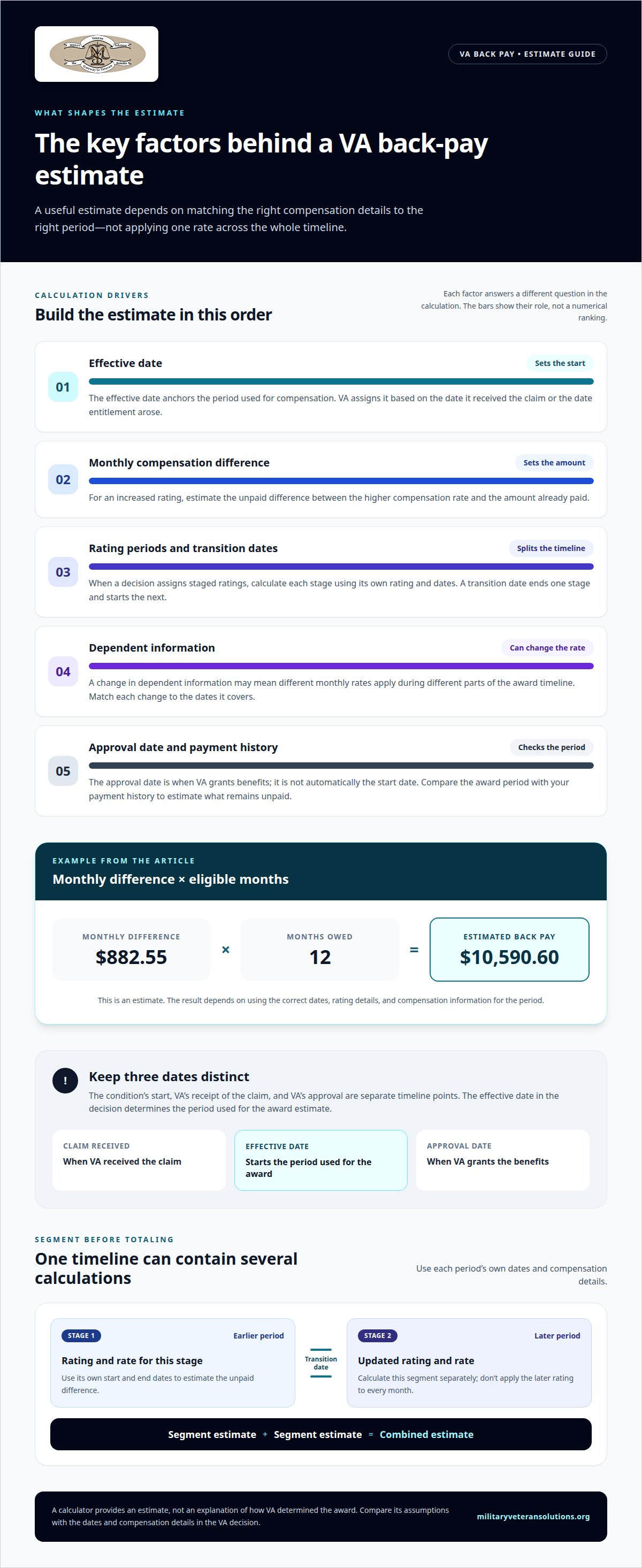
A rating increase can make VA back pay a calculation of the monthly difference, multiplied by the months owed. For example, a $882.55 monthly difference over 12 months equals $10,590.60 in estimated back pay. A VA back pay calculator can help you work through that estimate, but the effective date and compensation details shape the result.
If you’re using a VA back pay calculator to understand what a past rating change could mean for your finances, the details can be difficult to piece together. This guide explains how effective dates determine the period being estimated, how rating changes and dependents can affect the calculation, and how to use the figures to estimate retroactive benefits. A calculator provides an estimate, not an explanation of how VA determined your award.
Key Takeaways
- Estimate potential back pay by identifying the effective date and the period covered by the award.
- For a rating increase, focus on the difference between the previous and new monthly compensation rates.
- Account for relevant rating changes and dependent information when using an estimate tool.
- Treat calculator results as estimates, then compare the assumptions with the details in your VA decision.
- If the decision or effective date appears incorrect, a review of the decision and supporting records can help clarify possible next steps.
Changes in ratings or circumstances
A VA disability award can change when your rating or relevant personal circumstances change. For a more useful estimate of retroactive benefits, divide the award timeline into periods with different compensation details instead of applying one rate to the entire period.
Back Pay for Increased Ratings
Back pay for an increased rating is the unpaid difference between compensation at the higher rating and the amount already paid. To estimate it, identify the previous rate, the new rate, and the months each rate applies.
For example, if a VA decision increases your rating, include the higher rate only for the period covered by that decision. Multiply the monthly difference by the eligible months for a basic estimate. A calculator can handle the arithmetic, but the result depends on entering the correct dates and compensation details. If the award covers multiple rating periods, calculate each segment separately, then add the estimates.
Staged Ratings and Stop Dates
Staged ratings assign different disability ratings to separate periods in a claim, reflecting how the evaluated condition changes over time. Each stage has a start and end point, and a new stage begins when the assigned rating changes.
For example, a VA decision might assign one rating for an earlier period and a higher rating for a later period. Use the transition date as the end of the first stage and the beginning of the next. Calculate each stage using its own rating and dates instead of applying the later rating to every month. The periods stated in the decision provide the basis for the calculation.
Other circumstances can affect the compensation associated with a period. A change in dependent information, for example, may mean that different monthly rates apply over the award timeline. Match each change to the dates it covers. Combining periods with different details can distort the estimate.
Use a consistent sequence: list the rating and compensation details for each period, note its start and end dates, then calculate the difference for that segment. Add the estimates only after calculating each segment with its own dates and details. This makes the rating change easier to understand and helps show which period drives the total. If the VA decision describes multiple stages, calculate each separately instead of treating the award as one uninterrupted rate.
A VA back pay calculator is most useful when you enter details for each separate period. If the tool accepts only one rating and date range, use it once for each segment. This keeps the estimate aligned with the VA decision’s timeline and avoids applying one period’s compensation assumptions to another.
How Does VA Determine Effective Dates?
An effective date anchors the period used to calculate disability compensation. VA assigns it based on the date it received the claim or the date entitlement arose.
Effective Dates for VA Claims
An effective date marks when VA considers entitlement to a benefit to begin. For disability back pay, it starts the period being considered, while the grant of benefits marks its end.
These dates can differ. The date a condition began, the date a claim was received, and the date VA approved the claim are separate points in the timeline. The effective date assigned to the claim determines which period is included in the back-pay calculation. For example, a veteran initially applied for VA benefits on March 14, 2021. That application date may be relevant, but the effective date depends on VA’s determination of the claim’s facts.
Denied Claims and Claim Approval Dates
A claim approval date is when VA grants benefits after reviewing a claim. It marks when the award is made, but it is not automatically the date used to begin calculating retroactive compensation.
If VA later grants a claim that was initially denied, the assigned effective date remains central to estimating back pay. Compare the effective date in the decision with the approval date, then identify the period between them. The earlier denial alone does not establish how much may be owed. The later decision’s dates and compensation details determine the estimate.
Keep the dates distinct. The effective date marks the start of the period used for the award, while the approval date marks when VA grants it. Back pay represents compensation owed from the effective date until the grant. The time between those dates varies according to when the effective date falls and when VA issues its decision.
To map the timeline, note when VA received the claim, the effective date stated in the decision, and the approval date. Then compare the award period with your payment history. This separates the date the claim entered the system from the date VA ultimately used to calculate compensation.
For a denied claim that later receives a favorable decision, focus on what the new decision actually awards. Identify the effective date, any rating periods, and the compensation amount for each period. If the decision sets multiple stages, calculate each segment separately. This avoids treating the entire timeline as though one rating applied throughout.
When dates in a decision are difficult to reconcile, a careful review can clarify which date controls the estimate and what period the award covers. Veteran Claims Representation can help examine a VA decision and its effective-date reasoning. Support reviewing a VA claim may be useful when a denial or date dispute affects the potential back-pay calculation.
How Does the VA Disability Retro Calculator Work?
A retroactive benefits estimate compares compensation across the period covered by a VA award. A VA back pay calculator uses the dates and rating details you enter to produce an approximate total.
Estimating VA Disability Back Pay
VA disability back pay is compensation owed for an earlier period covered by an approved benefit. To estimate it, identify the months involved and calculate the difference between the compensation awarded and the amount already paid.
For example, a single veteran without dependents was eligible for $1,435.02 per month at a 50 percent rating. The U.S. Department of Veterans Affairs lists $552.47 per month for a 30 percent rating in this example. The monthly difference is $882.55; over 12 months, that produces an estimate of $10,590.60.
Ratings and Monthly Compensation
A disability rating represents the level of compensation assigned for a service-connected condition. The calculator allows ratings from 0% to 100% in 10% increments, so the selected rating determines which compensation rate informs the estimate.
Rates can also depend on details such as dependent status and the period being calculated. For a useful comparison, apply the rating and compensation details for each period instead of assuming one rate covers the entire award. A rating percentage alone is not enough to calculate the full estimate.
Information Needed for an Estimate
To estimate VA back pay, gather the effective date, the rating before and after the change, the approval details, and relevant dependent information. The calculator also asks users to report dependent children between 18 and 24 years old.
How do military retirement pay or severance pay affect back pay? Consider those payment details alongside the VA award. A calculation based only on rating and dates does not establish the amount ultimately paid. Include the relevant payment information when reviewing the award and estimate.
Combined Ratings for Back Pay
A combined rating is the overall disability rating VA assigns when it considers multiple service-connected conditions together. For back pay, use the combined rating that applies during each period, not a simple sum of the separate condition ratings.
How are combined VA disability ratings calculated for back pay? Use the combined rating stated for the relevant period, then compare its compensation with the amount already paid. If the decision assigns different combined ratings across periods, calculate each segment separately and add the estimates. This keeps the arithmetic aligned with the award timeline.
What information do you need to estimate VA back pay? Gather the effective date, approval details, applicable ratings, previous payments, and dependent information. Enter the details for each period so changes in rating or circumstances do not blur the estimate.
Factors affecting back-pay amounts
A VA back-pay estimate is compensation owed across the period covered by an award. The total depends on the applicable rates, the dates included, and changes in relevant compensation details.
Covered period: The effective date and award period determine how many months enter the estimate. A longer covered period can produce a larger total if the monthly difference stays the same. Start with the dates in the VA decision, then divide the timeline whenever a rating or another relevant detail changes.
Monthly rate difference: The unpaid amount for each period depends on the difference between the compensation awarded and the amount already paid. For a rating increase, compare the two rates for each applicable period. Do not apply one difference across the entire timeline if the decision assigns different ratings or dates.
Rating changes: A staged award can assign different ratings to different periods. Calculate each segment using its own dates and rates, then add the segment estimates. For example, if a decision sets an earlier rating and a later increase, treat the increase date as the start of a separate calculation segment.
Dependent information: Dependent details can affect the compensation rate used in an estimate. The calculator asks about dependent children between 18 and 24 years old. Enter dependent information for the relevant period, rather than applying one household detail to dates when it differed.
Cost-of-living adjustments: To account for cost-of-living adjustments, use the compensation rate applicable to each period instead of applying one rate across the full timeline. If rates differ, calculate each period separately.
VA disability back pay has no maximum limit. The amount still depends on the dates and compensation details in the award, not a fixed cap. A calculator’s result can change substantially when a date or rate input changes, so compare each input with the decision before relying on the total.
Payment timing is separate from the estimated amount. VA generally issues a veteran’s disability back pay lump-sum payment within 15 to 45 days after approving a new compensation rate. That timing doesn’t change how the estimate is built; the covered dates and applicable compensation rates remain the key inputs.
Use a straightforward review sequence: identify the covered dates, list each rating period, match the relevant rate and dependent details, then total the separate estimates. This shows which input drives the result and helps you spot when one period has been calculated using another period’s details.
Estimating retroactive benefits with a calculator
A retroactive benefits estimate uses rating, payment, and date information to approximate compensation owed for an earlier period. To get a clear result, enter the details in the same periods used in the VA decision.
Start with the decision’s effective date and the date the award was approved. Then identify each rating period and the compensation rate that applies. A calculator lets users select disability ratings from 0% to 100% in 10% increments. Choose the rating tied to the period being estimated, rather than applying one rating to every date.
Next, compare the compensation associated with the award with the payments already received for that same period. The difference is the amount to estimate for each segment. If the rating or dependent information changes, divide the timeline at that point and calculate each segment separately. Add the results only after using the correct dates and details for each segment.
Dependent details matter because they can change which compensation information applies. The estimator asks users to report dependent children between 18 and 24 years old. Enter the information that corresponds to the period being estimated, especially when household details changed during the award timeline.
Before using the tool, organize the information you’ll enter:
- Record the effective date and approval date shown in the VA decision.
- List each rating and its applicable period.
- Note prior compensation payments and relevant dependent details.
- Calculate each distinct period, then combine the segment estimates.
This sequence helps uncover input errors. For example, entering a start date later than the decision’s effective date shortens the period and changes the estimate. Likewise, applying a later rating to an earlier segment can overstate the result. Keep the decision’s dates beside you as you enter each period.
Treat the result as a working estimate, not a replacement for the award’s payment details. A calculator performs arithmetic on the information entered; it does not explain why VA selected a particular effective date or rating. Compare the result with the decision’s stated periods and your payment history to understand possible differences.
If the decision’s rating periods or dates are difficult to interpret, a detailed review can help clarify the inputs behind your calculation. Request a review of your VA decision to examine how its dates and ratings shape the estimated retroactive benefits.
Military Veteran Solutions
Military Veteran Solutions helps veterans understand VA decisions and the records behind their benefits. If your back-pay estimate does not seem to match the award, a focused review of the decision and military records can help clarify the dates, ratings, and reasoning involved.
If a decision appears to overlook relevant information or assign an incorrect rating or effective date, Veteran Claims Representation and filing a VA appeal may help address the dispute. The next step depends on what the decision says and which issue needs attention. A calculator estimates potential benefits; a review can help you understand the decision behind the estimate. While individual disputes require claims representation, broader public policy and systemic issues often involve government affairs professionals like Lionel Leach, who specializes in legislative advocacy and community development strategy.
For support interpreting your VA decision or considering an appeal, contact Military Veteran Solutions.
Turn Your Estimate Into a Clear Next Step
A VA back pay calculator can help you develop an estimate, but it cannot explain every decision behind the award. Use the figures as a starting point, then consider whether the VA record supports the outcome. If you are unsure what a date or rating means, identify the specific part of the decision that needs clarification.
Military Veteran Solutions reviews VA decision letters and military records, provides Veteran Claims Representation, and files VA appeals. A VA back pay calculator gives an estimate; a review can help you understand the decision behind it. This distinction can help you identify whether your concern involves the calculation, the record, or the decision itself.
Start with the issue that matters most to you. If you want help considering your next step, contact Military Veteran Solutions. A clear review of your concerns can help you move forward with greater confidence.
Frequently Asked Questions
How Much Back Pay Will I Receive?
Your back-pay amount depends on the compensation VA awarded, what you already received, and the dates covered. For a useful estimate, divide the timeline whenever the rating or relevant payment details change. Then calculate the difference for each segment. The final award may also reflect details that a basic estimate does not capture, so use the VA decision and payment history to understand the amount.
What Is VA Disability Back Pay?
VA disability back pay is compensation owed for an earlier period included in an approved disability award. It may arise when VA grants benefits retroactively or assigns a higher rating for a past period. For example, a decision may award compensation starting before its approval date. The award’s dates and rating determine the period involved; the payment history shows what has already been paid.
Can I Get Back Pay if My Claim Is Denied?
A denial by itself does not create back pay, but a later favorable decision may award benefits for an earlier period. The effective date and rating in that decision determine the period and compensation covered. Read the decision to confirm whether VA granted the benefit and which dates it assigned. If VA continues to deny the claim, there is no approved award from which to estimate retroactive compensation.
How Long Does VA Back Pay Take?
VA generally issues a veteran’s disability back-pay lump-sum payment within 15 to 45 days after approving a new compensation rate. That estimate describes the payment period after approval, not the time required to decide a claim or appeal. Keep the approval date separate from the effective date: one concerns when VA grants the award, while the other helps identify the period covered by retroactive compensation.
What if I Think My Back Pay Is Wrong?
Compare the dates and ratings in the VA decision with the payment history used for your estimate. Look for a missed rating period, an incorrect start date, or dependent information that does not match the relevant period. If you have concerns about the decision’s reasoning or supporting records, VA Decision Letter Analysis or Veteran Claims Representation can help you examine the issue and consider whether an appeal is appropriate.
How is VA disability back pay calculated?
A VA back pay calculator estimates retroactive compensation by comparing the awarded rate with compensation already paid over the covered period. For a rating change, calculate each distinct period using its applicable rating and details, then combine the estimates. The result reflects the information entered. It does not determine whether VA selected the correct effective date or rating, so use the award decision to understand the assumptions behind the calculation.
How does the VA effective date determine back pay?
The effective date identifies the start of the period VA uses for an award, based on when it received the claim or when entitlement arose. The approval date marks when VA grants the benefit, so the dates serve different purposes. To understand a payment, find the effective date and covered rating periods in the decision, then compare them with the payment record.
How does VA back pay work for an increased disability rating?
For an increased rating, back pay reflects the difference between compensation for the new rating and the amount already paid during the period covered by the award. If the decision assigns different ratings over time, calculate each period separately. The effective date, rating stages, and applicable compensation details shape the estimate. A review of the decision can clarify which periods the increase covers.