

What if adding your disability percentages gives you the wrong answer? That’s a common point of confusion: the VA combines ratings using a method often called “VA math,” not simple addition. A va disability calculator 2026 can help you estimate the result, but only if you understand what to enter and what the estimate cannot tell you.
You’re right to want a clearer picture of your rating and potential compensation. This guide explains how to estimate a combined rating using the VA’s method, why bilateral conditions and other inputs can affect the calculation, and how a rating estimate differs from an official VA decision or payment amount. Compensation can depend on factors beyond the combined percentage, including eligible dependents.
You’ll also learn what to review if your estimate doesn’t match your decision letter. A calculator is a planning tool, not a guarantee. Carefully reviewing the VA’s decision and the evidence behind it can help you understand the difference and consider informed next steps.
Key Takeaways
- Use a va disability calculator 2026 as a planning tool, not as a substitute for your official VA decision.
- Enter the ratings the VA assigned to your conditions, then follow the calculator’s prompts for relevant rating details.
- Keep your combined rating estimate separate from compensation, which may depend on factors such as eligible dependents.
- If the estimate and decision letter differ, recheck your inputs and identify the specific rating or calculation question to review.
What a VA Disability Calculator in 2026 Can, and Cannot, Estimate
Quick definition: A VA disability calculator is an estimating aid that applies VA combination rules to assigned disability ratings to approximate a combined percentage. It does not issue a VA decision, establish service connection, or determine an official benefit award.
The distinction matters. A calculator can help you understand how several ratings may combine, but it cannot decide whether a condition qualifies as service-connected or whether the evidence supports a particular rating. The United States Department of Veterans Affairs administers disability compensation. An online tool provides only an estimate based on the information entered and the rules it applies.
What does a VA disability calculator estimate?
You enter the disability percentages already assigned to your service-connected conditions, and the calculator estimates a combined disability percentage. It uses VA combination rules rather than adding the percentages as ordinary numbers. The result can give you a useful reference point, especially when several individual ratings make the overall calculation difficult to follow.
Think of it as a calculation aid, not an eligibility test. A calculator does not decide whether a condition is connected to your service, review medical or service records, or make an official determination about your claim. Its usefulness depends on accurate inputs and an appropriate application of VA rules. If you enter the percentage you believe a condition should receive instead of the rating actually assigned, the output will not represent your current VA rating picture.
Why can the estimate differ from your VA outcome?
A calculator works with the ratings and details you provide. The VA evaluates the claim itself, including service connection, evidence, and the applicable rating criteria. A tool cannot weigh that evidence or replace the VA’s review. That’s why a calculated estimate should not be treated as confirmation that a claim will be granted or that the VA will assign a particular percentage.
There’s also a difference between a combined disability percentage and compensation. The combined percentage is one part of how a disability claim is described; it is not itself a payment amount. Compensation may depend on additional circumstances, including eligible dependents. A calculator that displays an estimated payment may use assumptions or inputs beyond the ratings, so review what the tool asks for and how it presents the result.
- Combined rating: An estimate of how assigned disability ratings combine under VA rules.
- Compensation: A benefit amount determined through official VA processes and potentially affected by individual circumstances.
- Calculator result: An informational estimate based on the inputs and calculation method used by the tool.
Use a va disability calculator 2026 to plan questions and check your understanding, not to predict an official decision or guaranteed payment. If the estimate seems inconsistent with your VA outcome, first confirm that you entered the assigned ratings and used the relevant calculation assumptions. Then compare the result with your decision letter. A focused review of the letter and claim records can help clarify what the VA decided and which question needs attention.
How the VA Combines Disability Ratings Instead of Adding Them
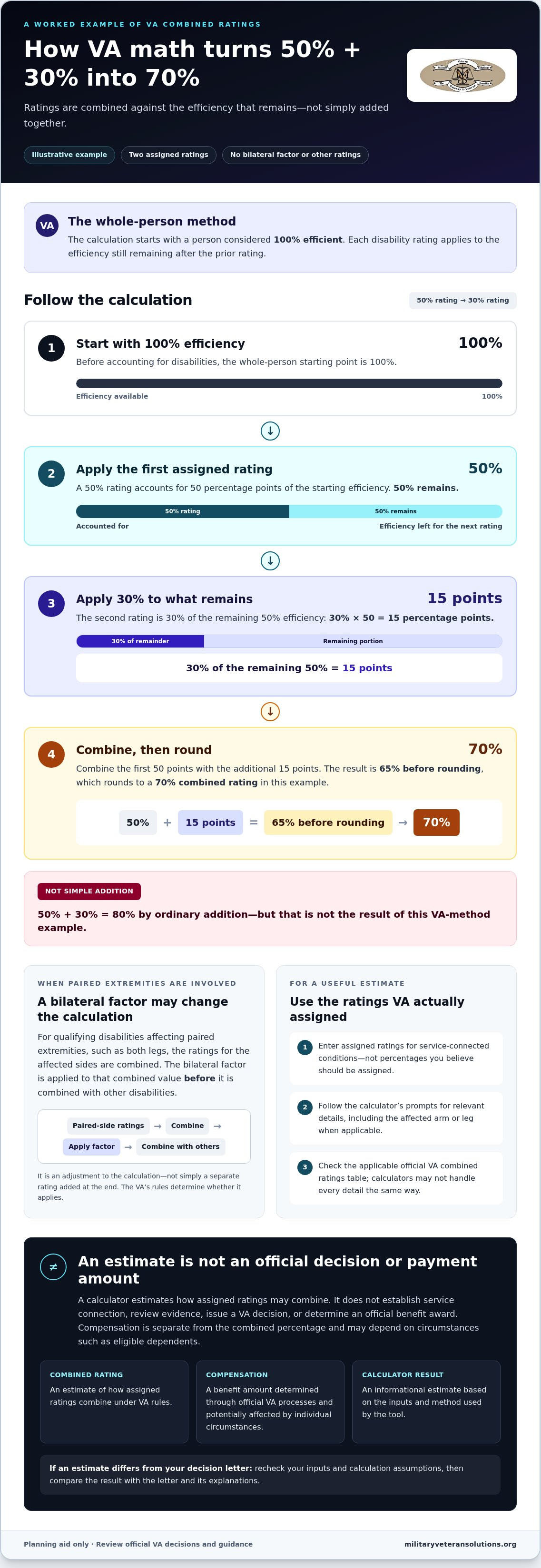
VA math starts with the idea that a person is considered 100% efficient before disabilities are accounted for. Each rating represents a portion of the efficiency that remains, not a percentage to simply add to every other rating. This whole-person method explains why the total of your individual ratings can be higher than your VA combined rating.
The VA’s explanation of combined disability ratings describes the table-based approach. A calculator may perform the steps for you, but understanding the basic math makes it easier to spot incorrect inputs and interpret the result.
How the whole-person calculation works
Illustrative example: Suppose a veteran has two assigned ratings, 50% and 30%, with no other ratings or special adjustments. The 50% rating leaves 50% of the person’s efficiency. The 30% rating then applies to that remaining 50%, producing 15 percentage points. Combine 50 and 15 to get 65% before rounding. Under the VA method, that value rounds to a combined rating of 70%.
Simply adding 50% and 30% gives 80%, which is not the result in this example. The difference comes from applying the second rating to what remains, not to the original 100%. This example is simplified and does not account for bilateral factors or other circumstances. Check the applicable official VA combined ratings table to confirm the calculation; do not assume every calculator handles every detail the same way.
When paired extremity ratings may affect the calculation
Extremity ratings involve conditions affecting the arms or legs. When qualifying disabilities affect paired extremities, such as both legs, the VA may apply a bilateral factor. In general, the ratings for the affected sides are combined, then the factor is applied to that combined value before it is combined with other disabilities. It is an adjustment to the calculation, not simply a separate rating to add at the end.
Enter each assigned rating and the affected arm or leg accurately. Do not mark a condition as bilateral just because it affects more than one body area; the VA’s rules determine whether the factor applies. If you’re uncertain how a decision treated paired conditions, compare the ratings and explanations in your decision letter with VA guidance before relying on an estimate.
For a deeper worked walkthrough, look for the related article, “How to Combine VA Disability Ratings for 100% in 2026.” A va disability calculator 2026 can speed up the arithmetic, but accurate ratings and classifications still matter. If you have questions about how your VA decision assigned or combined ratings, a review of your VA decision letter can help clarify what the decision says and which details warrant closer attention.
How a 2026 VA Rating Estimate Relates to Monthly Compensation
Your rating percentage and payment amount are related, but distinct. The combined disability rating is used to determine a compensation level, while the payment amount can also depend on factors such as eligible dependents. A calculator may show both a rating estimate and an estimated payment, but those outputs answer different questions.
| Item | What it represents | What to keep in mind |
|---|---|---|
| Combined rating | The result of combining assigned disability ratings under VA rules. | Dependent status does not change this percentage. |
| Compensation rate | The applicable monthly benefit amount associated with a rating and other relevant factors. | Eligible dependents can affect the amount at qualifying ratings. |
| Calculator output | An estimate generated from the information and assumptions entered. | It is not an official VA determination or a guarantee of payment. |
What information can affect a compensation estimate?
Disability ratings are the starting point for estimating compensation, but dependent status may affect the applicable payment amount. The VA provides additional compensation for eligible dependents for veterans rated 30% or higher. A calculator may therefore ask about a spouse, children, or dependent parents separately from the disability ratings. Do not treat those details as part of the combined-rating calculation.
Calculator inputs and assumptions vary. One tool may estimate only the combined percentage; another may also ask for dependent information and display an estimated payment. Review the fields carefully, and do not assume two tools use identical inputs or produce the same kind of output.
How to handle 2026 compensation rates
The 2026 VA compensation rates reflect a 2.8% cost-of-living adjustment and took effect December 1, 2025. The following examples are base monthly rates for a veteran without dependents:
- 10% rating: $180.42 per month
- 30% rating: $552.47 per month
- 100% rating: $3,938.58 per month
These figures are reference points, not a prediction of what any individual will receive. At 30% and above, eligible dependents may change the compensation amount. The applicable rate also needs to match the rating and effective period being considered. For planning, compare a calculator’s payment estimate with the official VA rate information for the relevant year and dependent situation. Do not rely on a displayed amount without checking the assumptions behind it.
A va disability calculator 2026 can help organize the numbers, but it cannot confirm your eligibility, decide your claim, or guarantee a monthly payment. If a calculator’s rating and payment figures seem inconsistent, check whether the rating input is correct, whether dependent information was included, and whether the tool is using the 2026 rates. Then compare those assumptions with your VA decision and the official compensation rate table.
How to Use a VA Disability Calculator: A Step-by-Step Check
A reliable estimate starts before you open the calculator. Gather your current VA rating information first, then use the tool to organize and check the figures. The va disability calculator 2026 can only work with the details you enter, so a small input mistake can change the result.
Gather the ratings and details before calculating
Use your current VA decision or rating information as the source for assigned percentages. Do not enter a percentage you think a condition should receive or a rating you hope to receive later. Make a simple list of each rated condition, its assigned percentage, and whether it affects an arm or leg. Record dependent information separately, and use it only if the calculator asks for it to estimate compensation.
Before you begin, prepare this compact checklist:
- Assigned ratings: Copy each percentage from your current VA information.
- Condition details: Note which conditions affect an arm or leg if the calculator requests extremity classifications.
- Dependent details: Keep relevant information separate from your disability ratings.
- Reference document: Have your decision or rating information available to verify entries.
Calculator layouts differ. Some ask only for disability percentages, while others include fields for extremity information or compensation-related details. Follow the tool’s prompts, but do not treat a field as a reason to change the rating assigned by the VA.
Enter, review, and save the estimate
- Add each assigned rating once. Match every entry to the rating information you gathered. Do not enter the same rating twice because a condition appears in more than one place in your notes.
- Classify affected extremities accurately. If asked, identify whether the rated condition affects an arm or leg and which side. Do not mark a condition as affecting a paired extremity unless that reflects the rating information and the calculator’s instructions.
- Check before calculating. Compare the entries with your source document. Look for a missed rating, duplicate entry, transposed percentage, or incorrect side. If the calculator asks for dependent information, keep it in the designated compensation fields rather than adding it as a disability rating.
- Review and save the result. Note the estimate, the inputs used, and any assumptions displayed by the calculator. Keeping these together makes it easier to repeat the estimate or compare it with a later VA decision.
Use the result as a planning reference, not proof of eligibility, entitlement, or a guaranteed benefit amount. If the estimate looks unexpected, confirm the entries before drawing conclusions. A careful review of your VA decision letter through Military Veteran Solutions, LLC can help you identify how the official decision treated each rating and what specific question may need further attention.
What to Do After Your VA Disability Calculator Estimate
A surprising result deserves a careful check, not an immediate conclusion. A va disability calculator 2026 can help you spot questions, but its output depends on the ratings and other details entered, along with the assumptions built into the tool. First verify the calculation inputs. Then compare the estimate with the VA’s actual decision.
How to review an estimate that does not match your records
Keep the calculator result and your current VA decision or rating information together. Check each assigned percentage against the source document, then confirm that every rating appears once and only once. If the calculator asked about affected arms or legs, verify those selections too. Review dependent information separately, since it may affect a payment estimate rather than the combined rating.
Next, identify exactly what appears different. Is the calculator’s combined percentage unexpected, or does the rating match while the estimated payment does not? Those are separate questions. A wrong entry or assumption points to a calculation issue; a difference between the estimate and the VA’s stated rating may call for a closer look at the decision itself.
- Check the inputs: Confirm percentages, extremity selections, and any dependent details against the relevant records.
- Check the calculation: Review whether the tool accounts for applicable combination rules and adjustments.
- Define the question: Note the specific rating, decision explanation, or payment estimate you’re trying to understand.
Write down the calculator’s inputs and output before changing anything. That gives you a clear reference point and helps prevent a small correction from being confused with a question about the VA’s decision.
When a detailed decision-letter review may help
If the entries appear accurate but you still can’t reconcile the estimate with the decision, read the decision letter closely. It explains the VA’s stated outcome and may help clarify which ratings were assigned and how the claim was addressed. Focus on the exact point that concerns you, such as a rating that differs from your records or an explanation you don’t understand. An estimate alone cannot establish that the VA made an error.
If the decision raises a possible appeal question, the related guide Filing VA Appeals Help: A Strategic Guide to Overturning Denials in 2026 can help you explore appeal-related considerations. A decision-letter analysis can also help organize questions about the outcome and the evidence discussed. Military Veteran Solutions, LLC provides decision-letter analysis, claims representation, and virtual consultations for veterans nationwide. Reviewing a decision or pursuing an appeal does not guarantee a particular rating or result.
Keep your records together and take the next step based on the specific issue you identified. If you want support understanding your VA decision, explore Military Veteran Solutions, LLC’s decision-letter analysis and claims representation options.
Turn Your Estimate Into a Clear Next Step
Your estimate can be more than a number on a screen. Use it to frame a focused question: which rating, record, or part of the VA decision do you want to understand better? That question gives you a practical starting point for reviewing your claim, whether you’re checking your records or considering what to do after a decision.
A va disability calculator 2026 can support your planning, but you don’t have to sort through a confusing decision alone. Military Veteran Solutions, LLC was founded by a disabled veteran who served ten years in the U.S. Army. Its support includes VA decision letter analysis, military record reviews, claims representation, and virtual consultations.
If you’re ready to turn uncertainty into a more informed plan, explore veteran claims representation and decision-letter analysis. A careful review can help you identify the questions that matter and consider your next steps with greater confidence. Your estimate is a starting point, and you can move forward one clear question at a time.
Frequently Asked Questions
Can a VA disability calculator determine whether my condition is service-connected?
No. A calculator can estimate a combined rating from ratings you enter, but it cannot determine whether a condition is connected to your military service. That decision comes through the VA claims process, where the VA considers applicable requirements and evidence, such as relevant service and medical records. If you haven’t received a decision on a condition, do not treat a calculator result as confirmation that the condition qualifies for compensation.
Does a VA disability calculator include Special Monthly Compensation?
Not necessarily. Calculator features vary, so check what the tool says its estimate covers. Special Monthly Compensation (SMC) is a separate benefit based on specific circumstances and a VA determination, not simply the result of combining disability percentages. For example, an estimate of ordinary monthly compensation does not establish SMC eligibility. Review current official VA information about the particular SMC benefit you’re considering, and do not rely on a calculator alone to determine entitlement.
Can I use a VA disability calculator before I file a claim?
Yes, to explore how ratings already assigned by the VA combine. But a va disability calculator 2026 cannot predict the percentage the VA may assign to a condition that hasn’t been decided. Keep pending conditions separate from existing ratings, and do not enter a hoped-for percentage as if it were official. For instance, you can calculate using your current ratings while listing a new, undecided condition separately for claim-planning purposes.
What happens if my VA calculator estimate is higher than the rating in my decision?
Start by checking the information you entered, including each percentage and any extremity selection. Then review the calculator’s method and assumptions against current VA guidance. If the difference remains, compare the result with the decision letter and identify the exact point of concern, such as a rating or explanation you don’t understand. A calculator difference alone does not establish that the VA made an error; the decision and supporting records need to be reviewed.
Can I receive compensation at the 100% rate with a combined rating below 100%?
In some circumstances, a veteran may qualify for compensation at the 100% rate through Total Disability based on Individual Unemployability (TDIU), even with a schedular combined rating below 100%. TDIU involves a separate VA determination, including whether service-connected disabilities prevent substantially gainful employment. A combined-rating calculator cannot decide that question. Review current VA guidance and your individual circumstances rather than assuming a particular payment level from the calculator result.
When do 2026 VA disability compensation rates take effect?
The 2026 VA disability compensation rates took effect December 1, 2025, following a 2.8% cost-of-living adjustment. The first payments reflecting the increase were made December 31, 2025. If a calculator displays a 2026 payment estimate, check that it uses rates for this effective period and accounts for any applicable dependent information. The displayed amount remains an estimate, not confirmation of your official benefit or payment.